What this example illustrates
A visitor needs a useful path, not just a polished first impression.
The opening screen puts the type of roofing work and a consultation action in view. Farther down, the demo separates specialty services, shows a scheduling interface, and provides space for reviews and community information. That structure helps a visitor answer two basic questions: “Do they handle my kind of roof?” and “How do I ask about my project?”
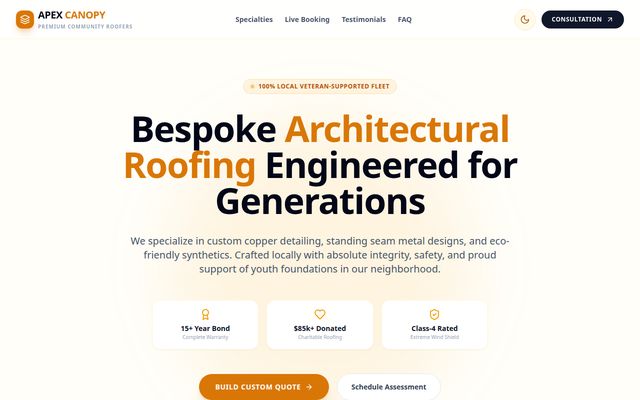
Planning your own page
What to carry into a real project
- Lead with the work you actually take on—repair, replacement, specialty materials, or another service—rather than a generic “all roofing” claim.
- Use real project photographs and a straightforward service-area description when you have them; a visitor should know whether you serve their location.
- Make the primary action a clear request for a conversation or estimate, and ask for only the details needed to follow up.
A Website Launch site can take a comparably polished one-page design direction using your real brand and content. In scope, it could introduce your roofing services, show a few real projects or proof points you are allowed to use, explain your service area, and offer a simple contact path. It does not need every interactive component in this demo to make the first visit useful.
Offer boundary
What the demo does not promise
The demo's live scheduler, detailed service catalog, displayed prices, testimonials, and community claims are illustrative. They are not verified customer evidence. Custom booking integrations, calculators, or a multi-page service architecture require separate scoping; they are not included automatically in the $995 Website Launch.
The published Website Launch scope governs the $995 offer: one mobile-friendly page, deployment, one year of hosting, and two consolidated revision rounds. Additional changes or features require a separate charge or agreement.
Before design begins
Questions worth settling first
- Which jobs do you want to attract, and which are outside your scope?
- What service area and contact details can you publish accurately?
- Do you have permission to use project photos, reviews, or certifications? If not, leave those claims out.
Digital Nebraska starts design after the completed intake form and required business details, logo, and domain access are received. Use the preparation checklist to gather those pieces.
Next step
Use the idea, then scope your own site.
Bring what you liked about this example into a conversation about your business. We can help decide what belongs on a focused first page and what should be planned separately.